 About ACME Mapper 2.2
About ACME Mapper 2.2
About ACME Mapper 2.2
This is a high-precision general purpose mapping application, based on Leaflet.js with a bunch of things added on.
The basic map operation is the same as any other "slippy" map - you drag the map with your mouse, and double-click to center.
In the upper left corner is a widget that lets you zoom in and out. "+" and "-" zoom in and out one step; "+5" and "-5" go five steps. If one of the buttons is grayed-out, that means you can't zoom that much with the current map layer. Different layers have different zoom limits.

In the upper right corner is a widget that lets you change the map layers shown. Move your mouse to the widget and it will open up, showing the available layers.
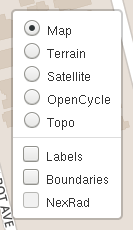
Once the layers widget is open, you can choose one basemap and any number of overlays.
The Options Panel has a setting that makes the layers widget stay open all the time, instead of opening on hover. Some people prefer this. You can also turn the layers widget completely off if you like.

In the lower left corner you will find a scale widget. This is updated automatically as you zoom in and out. By default it shows both meters/kilometers and feet/miles. In the Options Panel is a setting to choose only metric, only imperial, or no scale widget at all.

One thing ACME Mapper adds is the little cross-hairs widget in the middle of the map. This indicates the exact point you are centered on. The Options Panel lets you turn the crosshairs on and off.
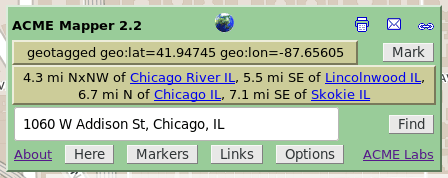
In the lower right you have the Control Panel. This lets you do all sorts of stuff. All the controls have 'tooltips', so one way to find out what something does is to move your mouse over that item - a short description will pop up. Or you can read about the controls here:
 These three icons let you Print, Email, or get a Link to
the current map.
These three icons let you Print, Email, or get a Link to
the current map.
 The exact coordinates of the center of the map.
You can set your preferred format in the Options Panel.
The exact coordinates of the center of the map.
You can set your preferred format in the Options Panel.
 A button to place a marker at the current coordinates.
 The distance and direction from a few nearby place-names.
 A Find box that accepts a wide variety of location specifiers:
 A button to move the map to your current location, if that can
be figured out.
A button to move the map to your current location, if that can
be figured out.
 A button to bring up the Markers Panel, where you can see
all your current markers and rename/delete/goto them.
A button to bring up the Markers Panel, where you can see
all your current markers and rename/delete/goto them.
 A button to bring up the Links Panel, containing a bunch of
links to other map-related web sites.
The links are automatically updated to go to the same location
you are looking at in ACME Mapper.
A button to bring up the Links Panel, containing a bunch of
links to other map-related web sites.
The links are automatically updated to go to the same location
you are looking at in ACME Mapper.
 A button to bring up the Options Panel, where you can set
all sorts of preferences to change the Mapper's interface.
Some of them were mentioned above, but there are lots more.
You can change how scroll-wheel zoom works.
You can have a marker automatically created when you do a Find.
Most of the UI elements can be made to go away, if you
don't want them.
There's a flickr checkbox that adds a new UI element, off
by default, that shows flickr photos in the current area.
Also, the options in the "General Map UI" section apply not
just to Mapper but to all maps hosted on acme.com.
So even though the other maps don't have their own Options Panel,
you can still set their options using Mapper's panel.
A button to bring up the Options Panel, where you can set
all sorts of preferences to change the Mapper's interface.
Some of them were mentioned above, but there are lots more.
You can change how scroll-wheel zoom works.
You can have a marker automatically created when you do a Find.
Most of the UI elements can be made to go away, if you
don't want them.
There's a flickr checkbox that adds a new UI element, off
by default, that shows flickr photos in the current area.
Also, the options in the "General Map UI" section apply not
just to Mapper but to all maps hosted on acme.com.
So even though the other maps don't have their own Options Panel,
you can still set their options using Mapper's panel.
One more thing: the map automatically remembers all your settings - your last location, zoom, and map types, your markers, and your options. Next time you visit it will all still be there.
The original ACME Mapper was an improved front-end for Terraserver, a large geographical image database owned by Microsoft.
When Terraserver launched in 1998, it had aerial/satellite imagery for the entire world, at a resolution of 1 meter/pixel. Shortly after launching they removed everything but the USA images; this was never explained.
Terraserver's user interface is horrible, so I made my own interface that used their map tiles. I called it ACME Mapper and opened it to the public in 2001.
In 2004 Terraserver added high-resolution color images to their database. Coverage was limited to a few large metropolitan areas, but resolution went down to 1/4 meter/pixel, which is very good.
In 2005 Google Maps came out with their own aerial/satellite imagery, covering the whole world at a variety of resolutions, but nowhere better than 1 meter/pixel. Then in 2006, Google Maps added two more zoom levels, giving 1/4 meter resolution - same as Terraserver but much wider coverage. There's also a street map layer, for some countries. Furthermore, Google's maps are being actively maintained and improved, while Terraserver's haven't changed for years. It was time to switch.
ACME Mapper 2.1 was a re-write using the Google Maps API. It added wider coverage, and some new features such as multiple markers and place-name searching.
ACME Mapper 2.2 switches the underlying map system to Leaflet.js.

ACME Labs / ACME Mapper 2.2 / About
